Posts Tagged ‘iweb hosting sites 2012’

posted by on iWeb, OS X Lion

3 comments

So, I installed OS X 10.8 Mountain Lion today and I am happy to report that it seems to be running the same as it had in OS X 10.7 Lion. After I turned on dictation “located in your system preferences” I was pleasantly surprised that Dictation works in iWeb.


If you have more than 1 iWeb domain file you will need to use the iWeb Multi-domain tool. Here is the link:

Youtube video:

Sorry, the dictation portion of the video is a little choppy. I need a new machine.

http://jeffnitschke.com/Multi_Domain_iWeb.zip


And if you haven’t got a 3rd party web host yet I would suggest IX Web hosting.

I have been using IX Web hosting for several years with little to no problems “usually the problem was something I did” and they have been quick to solve any issue I have come across. The have plans that start at $3.95 a mo (USD) and their customer service is top notch.

http://jeffnitschke.com/IXWebHosting.html

http://jeffnitschke.com/wordpress/2012/06/how-do-i-move-my-mobileme-site-ix-web- hosting-blog/

posted by on Web hosting

No comments

IX Web hosting is one of the top 10 hosting companies in us, in terms of size. According to third party estimates, they host over 494,000 domains. They own over 1% of US market share. They also have a sister company named Host Excellence, which offers packages similar to ix web hosting.

With plans starting from $3.95 per month, they offer excellent value for money. Available in both Linux and Windows hosting, IX Web Hosting is a good choice for hobby, entertainment sites and small business web sites.

IX Web Hosting Features Review

They provide nearly everything needed for a business website. They use H-Sphere control panel, which is good. H-Sphere is not as popular as cPanel but it is simple, easy to use and does almost everything needed for a normal website. Firewall Protection, Spam filtering, Website Templates etc. are standard with all packages. Also, they offer free domain names with all plans.

All the plans come with unlimited space and bandwidth. The major difference among them is the number of IP address provided. For multiple sites hosting, from SEO point of view it is good to have different IP addresses. So webmasters who want to host multiple sites may find “Business Plus” hosting very helpful.

All the 8 IP address will most probably be from different class “C” even though IX doesn’t guarantee it. Having 8 different class C IP’s is great news for webmasters who want to link their sites and transfer the PR. Most hosts who offer unlimited/large number of add-on domains, doesn’t provide different IP for each domains.

IX Web Hosting Coupon

They offer 10% discount on the billing amount amount if you go through a secret link before signing up.

Scroll to the bottom of the page to find the secret Link.


IX Web Hosting Performance Review

IX Web hosting offers reasonably good performance. Their uptime as verified by our test account has been poor during August 2008 – October 2008. But it has been steadily improving from the second half of October 2008 and is looking really good these days.
We have been monitoring our site hosted with IX, using a third party service provider. Screen shot below shows the uptime details for the year 2008.


IX Web Hosting Price Value

IX Web hosting is definitely cheap, with offers starting from $3.95. They also allow multiple domains in same account. This is pretty useful for webmaster with many sites.

IX Web Hosting Support Review

IX Web offer toll free(US only) 24/7 support lines, support chat and support tickets. Toll free lines could have waiting time of up to 30 mts., which is not really that bad. They do reply to support tickets in time as well. Even though the support is fast, there has been reports that the support technicians are sometimes not very competitive. Probably this is not the case always, but there are reports of support tickets not giving the exact information requested. We must add, these kind of things happens for almost every host and sometimes only the bad things get reported.

Video Testimonials:


http://www.ixhostingreviews.com

posted by on iWeb, Web hosting

No comments

After you finish with a new iWeb site, you can publish your site by using third party Web host (I use IX WebHosting plans start at $3.95 a mo).

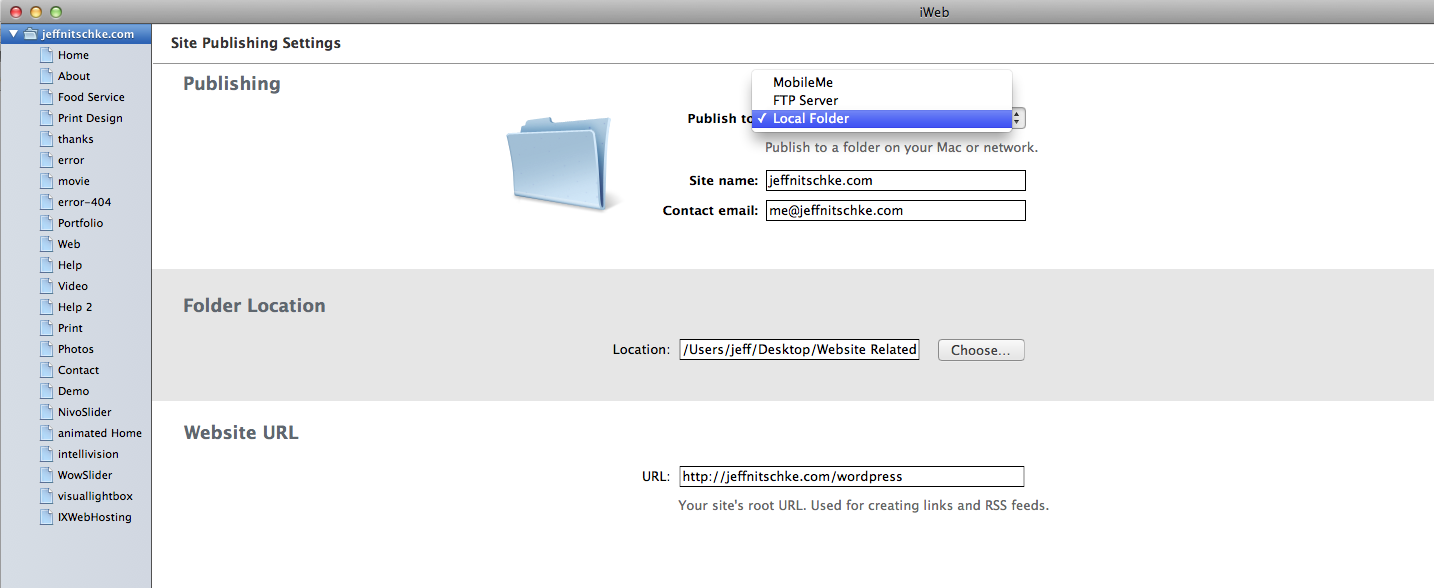
You specify where your iWeb site will be published from the Site Properties screen. Click the site name in the Site Organizer to display the Publish To pop-up menu. iWeb offers the following publishing options:

Choose where to publish your site.
  • Publish to MobileMe: This is no longer an option (I use IX WebHosting plans start at $3.95 a mo).
  • Publish to FTP Server: This publishing option provides you with a completely different collection of settings on the Site Properties screen. You’ll need to furnish iWeb with your Web server’s FTP settings (which should be furnished to you by the host) and your site’s address (or URL).
  • Publish to a Local Folder: The final publishing option creates a folder on your hard drive that contains all the files to display your Web site. Once again, you must supply the site URL as it will appear on the Internet after you copy or upload the site files to the server. This option allows you access the the HTML files incase you want to add code like, Google Analytics

After you’ve set the type of publishing the site will use, it’s time to take care of business! Click the site to select it in the Site Organizer and then click the Publish Site button on the toolbar. The application takes care of everything else, automatically uploading all pages and media (if you chose the FTP publishing) or saving them on your hard drive (if you chose the Local Folder option).

In a hurry? You can elect to publish just the changes necessary to update your site: Instead of clicking the Publish Site button on the toolbar, click the File menu and choose Publish Site Changes.

http://www.ixhostingreviews.com

posted by on iWeb, Web hosting

No comments

You will want to get a 3rd party host like IX Webhosting before June 30, 2012 when MobileMe would be permanently discontinued

http://jeffnitschke.com/IXWebHosting.html


Experience

In 1999 we began supporting our first hosting customers on a server in someone’s living room, and since then we have grown into a company with over 110,000 clients hosting over 470,000 sites with us. What does this mean for you? Not only do we know what we’re doing, but you’re not going to have to worry about changing hosting companies because we’re not going anywhere.


Personal Customer Support

At IX we decided that we wanted to provide the best and most exceptional customer support in the industry. That is why we developed a company wide philosophy to provide a unique and personalized customer support experience. This is how our Personal Support Rep program was born.

When you sign up with us, we assign you your own support agent that you can contact directly with any questions or issues you might have. (click here to learn more about the program).


Zero Risk Guaranteed

Every webhost offers a 30-day money back guarantee and many also offer an anytime money back guarantee, but who offers completely free hosting? We do. For a full week, you can kick the tires, take her out for a spin, and see how she handles in the straights – for no charge. Seriously. We won’t charge your card until after the 7 day trial period, and if you cancel before it’s up – you will never be billed. No fighting for refunds, no fine print.

(click here to start your risk free trial now)


Cutting Edge Technology

The success of a hosting company largely depends on whether they are able to keep their customers’ websites online and accessible to the web. But 99.9% website uptime is really just one one of those phrases you hear hosting companies throw around, but not define in real terms. We have a Tier 3 n +1 redundant data center that keeps your site up the maximum amount of time.

(click here for all the geeky details to find out how)


The IX Web Hosting Community

With our database of over 110,000 customers, joining IX Web Hosting means that you become the newest member of an experienced and interactive community. With the help of social media such as twitter, blogs, facebook, a technical status blog and online Success Tools that include step by step video tutorials.

http://www.ixhostingreviews.com

posted by on iWeb, Web hosting

No comments

I use IX WebHosting, they have plans that start from just $3.95 per month.

http://www.ixhostingreviews.com

Summary

This article explains how to move an iWeb site, including one with a personal domain, from MobileMe to another web hosting service.

Notes:

  • You need an account with a web hosting provider that supports FTP (File Transfer Protocol) before proceeding.
  • When publishing an iWeb site to a web hosting service other than MobileMe, the following features are not available: blog and photo comments, website password, blog search, and hit counter.


Move an iWeb site that is currently published to MobileMe

If you have iWeb ’09 (version 3.0) or later, follow these steps from the Mac on which you published your web site. To check which version of iWeb you have choose iWeb > About iWeb.

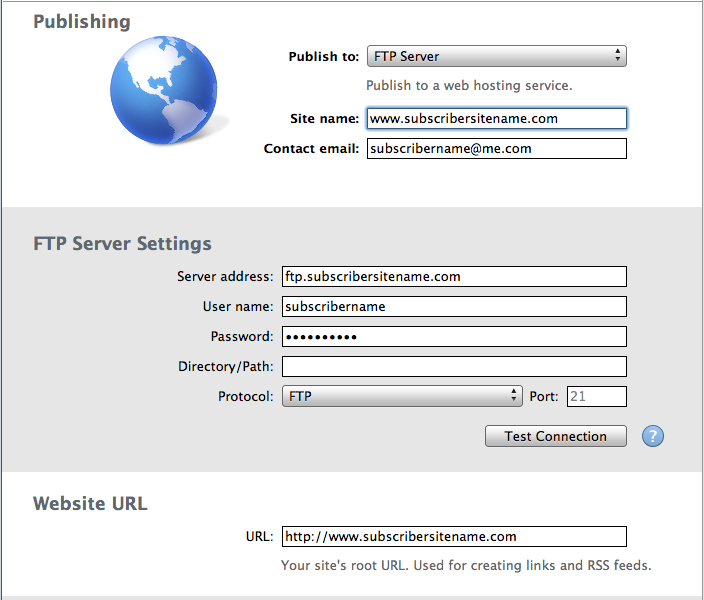
  1. Open iWeb ’09 and click the name of the site you want to publish in the left sidebar. The Site Publishing Settings window appears.
  2. In the Site Publishing Settings window, choose FTP Server from the Publish to drop-down menu.
  3. Enter the following information:
    • Site name (optional).
    • Contact email (optional).
    • FTP server address (provided by your web hosting service).
    • User name for publishing to your web hosting service.
    • Password.
    • Directory and path (if required by your web hosting service).
    • Protocol and port (if required by your web hosting service).
  4. Click the Test Connection button to make sure you have entered your information correctly.
  5. Enter the URL for your website.
  6. Click the Publish Site button.

For a video overview of publishing your site to an FTP server, please watch this iWeb tutorial.


If you have an earlier version of iWeb, select the “Publish to Folder” option to publish your site to a local folder and then upload it to a third-party hosting service.

  1. Open iWeb and choose File > Publish to Folder. By default, iWeb saves the published results to a Sites folder in your Mac Home folder.
  2. Once your site is saved to the folder, you can upload it to the FTP server with an FTP publishing application.

If you no longer have a copy of your site in iWeb, you can download the data directly from your MobileMe iDisk and then upload it to a third-party hosting service.

  1. From the Finder menu, choose File > New Finder Window.
  2. Under Devices on the left, click the iDisk icon and then choose Web > Sites.
  3. In the Sites folder, locate the “index.html” file and the folders named after your existing iWeb-published site.
  4. Move the “index.html” file and folders to your desktop and upload them to your FTP server.

Move a personal domain from MobileMe to another web hosting service

  1. Open a browser window and go to your web hosting service’s site.
  2. Follow the site’s instructions for configuring your personal domain. Note the CNAME (Canonical Name) record required by your provider.
  3. Go to your personal domain registrar’s site and find the CNAME configuration section.
  4. Change the CNAME from web.me.com to your web hosting service’s address (this change may take some time to process).
  5. Sign in to me.com/account.
  6. On the Account page, click Personal Domain on the left.
  7. Click the Remove Domain button on the right to remove your configured personal domain from MobileMe.


WowSlider in iWeb

Feb
2012
12

posted by on iWeb, Web hosting

No comments

Here is an answer to a recent question I received.

Just want to let you know I really like your site and what you have done with the WowSlider. I found you through the Apple forum and I’ve checked out some of your other work- very creative!!

I’m wondering if you might be able to point me in the right direction for how to use iWeb (’09 version) with wow slider. I still publish to Mobile Me which will change obviously in June – but for now, I would love add it to my site but I can’t get it to work. I have tried following the instructions from wow slider but I get tripped up when it comes to publishing – since I use mobile I’m not sure how to get it to work. I tried putting it in my disc folders per some of the suggestions I’ve seen on the Apple forums and in some articles – but so far no luck in getting it to work (I feel like an idiot cause I can’t figure it out!!). Since I really like how it looks on your site, I figure I’d come right to the source and ask how you did it!!

I appreciate your time and would welcome any ideas at your convenience. Thanks for the inspiration and I wish you the best in your next endeavor— which I look forward to seeing – whatever that may be!

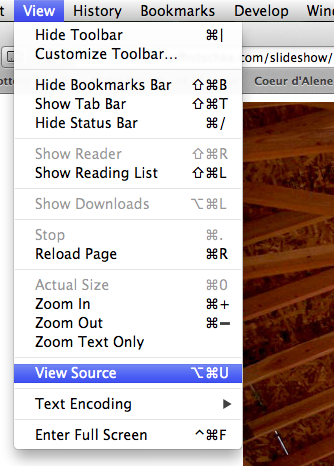
In my case I uploaded a folder called “slideshow” to my server resulting in a page like this ” http://jeffnitschke.com/slideshow/ ” then I used the view source menu  to see the html code & then selected all the text “command A on the keyboard”, copied, & pasted the code into a new text edit document “just because it is easier to read & edit then in the little snippet window in iWeb” then anywhere you have a href=” or src=” 

you will need to add your mobileme info something like this ” <link rel=”stylesheet” type=”text/css” http://web.me.com/MMeUsername/slideshow/engine1/style.css” media=”screen” />”

Hope this helps you out. For web hosting I use IX Webhosting they offer lots of 1 click installs like this wordpress blog and have excellent customer service. Their “expert plan” starts at just $3.95 a month and allows for unlimited domains & email address and also comes with 2 dedicated IP address’s. All plans also have unlimited disk space, data transfer, & bandwidth.

hope this helps


Here is the code from my html snippet:

<!DOCTYPE html PUBLIC “-//W3C//DTD XHTML 1.0 Strict//EN”
“http://www.w3.org/TR/xhtml1/DTD/xhtml1-strict.dtd”>
<html xmlns=”http://www.w3.org/1999/xhtml”>
<head>
<title>newslider generated by WOWSlider.com</title>
<meta http-equiv=”content-type” content=”text/html; charset=utf-8″ />
<meta name=”keywords” content=”newslider, WOW Slider, Simple Slider jQuery, Auto Slider jQuery” />
<meta name=”description” content=”newslider created with WOW Slider, a free wizard program that helps you easily generate beautiful web slideshow” />
<!– Start WOWSlider.com HEAD section –>
<link rel=”stylesheet” type=”text/css” href=”http://jeffnitschke.com/slideshow/engine1/style.css” media=”screen” />
<style type=”text/css”>a#vlb{display:none}</style>
<script type=”text/javascript” src=”http://jeffnitschke.com/slideshow/engine1/jquery.js”></script>
<!– End WOWSlider.com HEAD section –>
</head>
<body style=”background-color:#ffffff”>
<!– Start WOWSlider.com BODY section –>
<div id=”wowslider-container1″>
<div class=”ws_images”>
<a href=”#”><img src=”http://jeffnitschke.com/slideshow/data1/images/1471.jpg” alt=”1471″ title=”1471″ id=”wows0″/></a>
<a href=”#”><img src=”http://jeffnitschke.com/slideshow/data1/images/1553.jpg” alt=”1553″ title=”1553″ id=”wows1″/></a>
<a href=”#”><img src=”http://jeffnitschke.com/slideshow/data1/images/2566.jpg” alt=”2566″ title=”2566″ id=”wows2″/></a>
<a href=”#”><img src=”http://jeffnitschke.com/slideshow/data1/images/4214.jpg” alt=”4214″ title=”4214″ id=”wows3″/></a>
<a href=”#”><img src=”http://jeffnitschke.com/slideshow/data1/images/5053.jpg” alt=”5053″ title=”5053″ id=”wows4″/></a>
<a href=”#”><img src=”http://jeffnitschke.com/slideshow/data1/images/5540.jpg” alt=”5540″ title=”5540″ id=”wows5″/></a>
<a href=”#”><img src=”http://jeffnitschke.com/slideshow/data1/images/5556.jpg” alt=”5556″ title=”5556″ id=”wows6″/></a>
<a href=”#”><img src=”http://jeffnitschke.com/slideshow/data1/images/6396.jpg” alt=”6396″ title=”6396″ id=”wows7″/></a>
<a href=”#”><img src=”http://jeffnitschke.com/slideshow/data1/images/6735.jpg” alt=”6735″ title=”6735″ id=”wows8″/></a>
<a href=”#”><img src=”http://jeffnitschke.com/slideshow/data1/images/6743.jpg” alt=”6743″ title=”6743″ id=”wows9″/></a>
<a href=”#”><img src=”http://jeffnitschke.com/slideshow/data1/images/7310.jpg” alt=”7310″ title=”7310″ id=”wows10″/></a>
<a href=”#”><img src=”http://jeffnitschke.com/slideshow/data1/images/7579.jpg” alt=”7579″ title=”7579″ id=”wows11″/></a>
<a href=”#”><img src=”http://jeffnitschke.com/slideshow/data1/images/8981.jpg” alt=”8981″ title=”8981″ id=”wows12″/></a>
<a href=”#”><img src=”http://jeffnitschke.com/slideshow/data1/images/9519.jpg” alt=”9519″ title=”9519″ id=”wows13″/></a>
<a href=”#”><img src=”http://jeffnitschke.com/slideshow/data1/images/9599.jpg” alt=”9599″ title=”9599″ id=”wows14″/></a>
<a href=”#”><img src=”http://jeffnitschke.com/slideshow/data1/images/clocktower.jpg” alt=”clocktower” title=”clocktower” id=”wows15″/></a>
<a href=”#”><img src=”http://jeffnitschke.com/slideshow/data1/images/flower.jpg” alt=”flower” title=”flower” id=”wows16″/></a>
<a href=”#”><img src=”http://jeffnitschke.com/slideshow/data1/images/lawn.jpg” alt=”lawn” title=”lawn” id=”wows17″/></a>
<a href=”#”><img src=”http://jeffnitschke.com/slideshow/data1/images/sink.jpg” alt=”sink” title=”sink” id=”wows18″/></a>
<a href=”#”><img src=”http://jeffnitschke.com/slideshow/data1/images/waterski.jpg” alt=”waterski” title=”waterski” id=”wows19″/></a>
</div>
<div class=”ws_bullets”><div>
<a href=”#wows0″ title=”1471″><img src=”http://jeffnitschke.com/slideshow/data1/tooltips/1471.jpg” alt=”1471″/>1</a>
<a href=”#wows1″ title=”1553″><img src=”http://jeffnitschke.com/slideshow/data1/tooltips/1553.jpg” alt=”1553″/>2</a>
<a href=”#wows2″ title=”2566″><img src=”http://jeffnitschke.com/slideshow/data1/tooltips/2566.jpg” alt=”2566″/>3</a>
<a href=”#wows3″ title=”4214″><img src=”http://jeffnitschke.com/slideshow/data1/tooltips/4214.jpg” alt=”4214″/>4</a>
<a href=”#wows4″ title=”5053″><img src=”http://jeffnitschke.com/slideshow/data1/tooltips/5053.jpg” alt=”5053″/>5</a>
<a href=”#wows5″ title=”5540″><img src=”http://jeffnitschke.com/slideshow/data1/tooltips/5540.jpg” alt=”5540″/>6</a>
<a href=”#wows6″ title=”5556″><img src=”http://jeffnitschke.com/slideshow/data1/tooltips/5556.jpg” alt=”5556″/>7</a>
<a href=”#wows7″ title=”6396″><img src=”http://jeffnitschke.com/slideshow/data1/tooltips/6396.jpg” alt=”6396″/>8</a>
<a href=”#wows8″ title=”6735″><img src=”http://jeffnitschke.com/slideshow/data1/tooltips/6735.jpg” alt=”6735″/>9</a>
<a href=”#wows9″ title=”6743″><img src=”http://jeffnitschke.com/slideshow/data1/tooltips/6743.jpg” alt=”6743″/>10</a>
<a href=”#wows10″ title=”7310″><img src=”http://jeffnitschke.com/slideshow/data1/tooltips/7310.jpg” alt=”7310″/>11</a>
<a href=”#wows11″ title=”7579″><img src=”http://jeffnitschke.com/slideshow/data1/tooltips/7579.jpg” alt=”7579″/>12</a>
<a href=”#wows12″ title=”8981″><img src=”http://jeffnitschke.com/slideshow/data1/tooltips/8981.jpg” alt=”8981″/>13</a>
<a href=”#wows13″ title=”9519″><img src=”http://jeffnitschke.com/slideshow/data1/tooltips/9519.jpg” alt=”9519″/>14</a>
<a href=”#wows14″ title=”9599″><img src=”http://jeffnitschke.com/slideshow/data1/tooltips/9599.jpg” alt=”9599″/>15</a>
<a href=”#wows15″ title=”clocktower”><img src=”http://jeffnitschke.com/slideshow/data1/tooltips/clocktower.jpg” alt=”clocktower”/>16</a>
<a href=”#wows16″ title=”flower”><img src=”http://jeffnitschke.com/slideshow/data1/tooltips/flower.jpg” alt=”flower”/>17</a>
<a href=”#wows17″ title=”lawn”><img src=”http://jeffnitschke.com/slideshow/data1/tooltips/lawn.jpg” alt=”lawn”/>18</a>
<a href=”#wows18″ title=”sink”><img src=”http://jeffnitschke.com/slideshow/data1/tooltips/sink.jpg” alt=”sink”/>19</a>
<a href=”#wows19″ title=”waterski”><img src=”http://jeffnitschke.com/slideshow/data1/tooltips/waterski.jpg” alt=”waterski”/>20</a>
</div></div>
<a style=”display:none” href=”http://wowslider.com”>Text Slider jQuery by WOWSlider.com v1.7m</a>
<div class=”ws_shadow”></div>
</div>
<script type=”text/javascript” src=”http://jeffnitschke.com/slideshow/engine1/script.js”></script>
<!– End WOWSlider.com BODY section –>
</body>
</html>

iWeb Web Hosting

Feb
2012
04

posted by on iWeb, Web hosting

No comments

I use IX Webhosting  they offer lots of 1 click installs like this wordpress blog and have excellent customer service. Their “expert plan” starts at just $3.95 a month and allows for unlimited domains & email address and also comes with 2 dedicated IP address’s. All plans also have unlimited disk space, data transfer, & bandwidth.


http://www.ixhostingreviews.com

iWeb questions

Jun
2011
20

posted by on iWeb

15 comments

So, do you have any iWeb questions? Post them here and I will do my best to answer them for you.

Sent from my iPhone

Follow

Get every new post on this blog delivered to your Inbox.

Join other followers:

%d bloggers like this: